Get started with your ParcelShopper dashboard
Find your saved property research and followed auctions, then pick up where you left off.
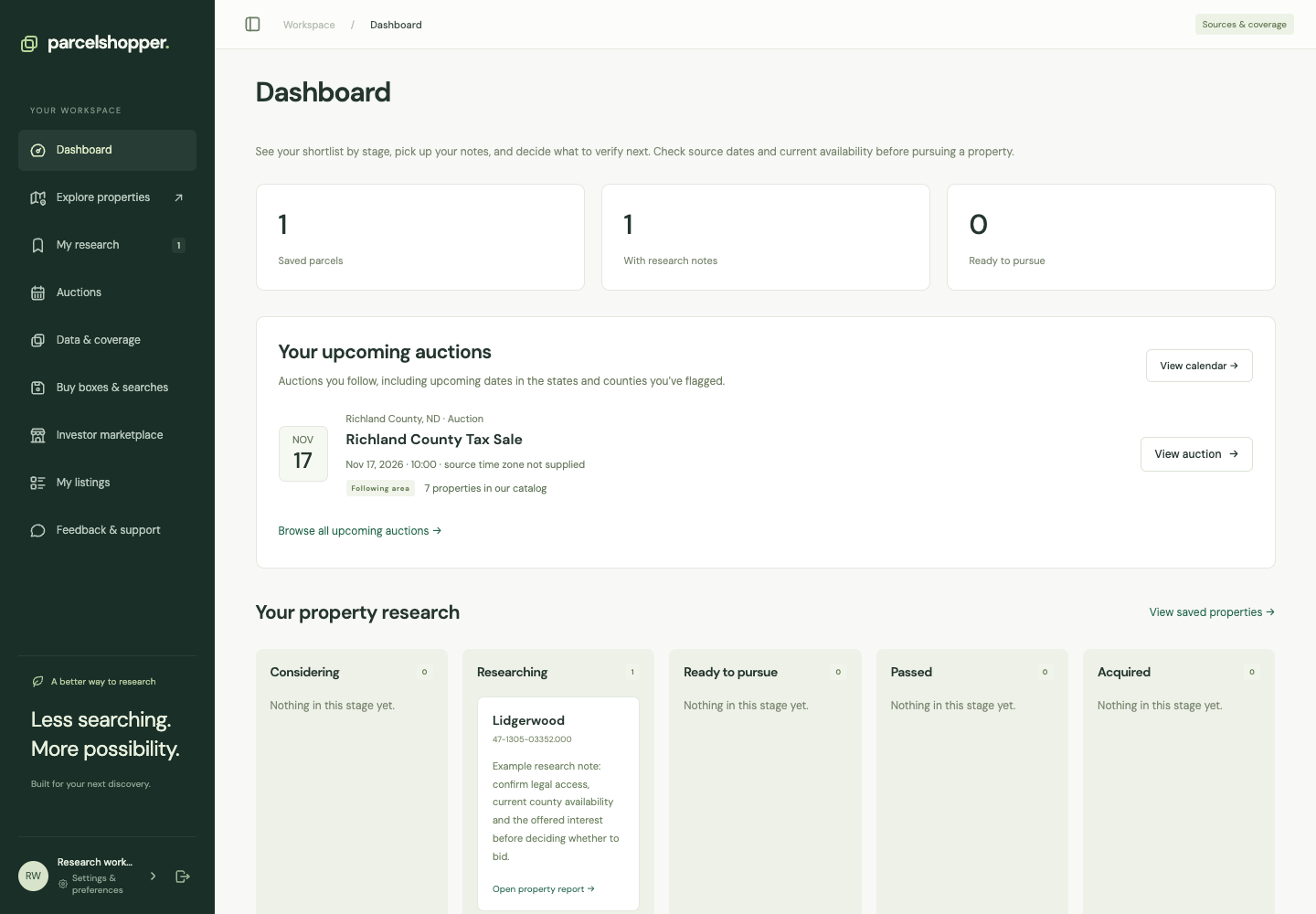
Your dashboard shows saved property research and auctions you follow. Return here to pick up an investigation or check the next sale in a county you track.
Demonstration account, November 8, 2026. Live inventory and counts will differ.
Save your first property
- Open Explore properties from the sidebar and choose a state.
- Add filters, then open a property report.
- Check its source and purchase route. Choose Save parcel if you want to revisit it.
- Add a note and research stage.
- Return to Dashboard to reopen your work.
Saving does not reserve the property. Check its official listing before pursuing a purchase.
Add auctions
Open Auctions and follow an event, county or state. Relevant upcoming auctions will appear on your dashboard. Open one for its description, requirements and any linked properties. A sale date may be available before its parcel list.
If the dashboard is empty
New accounts have no saved research or auction follows. Save a parcel or follow a county to get started. Your sidebar also has saved searches, Data & coverage, the investor marketplace and My listings. Account settings contain delivery controls.
For instructions, see searching and filtering, research notes or auction follows. Your plan determines feature access and allowances.

Discussion