Save properties and research notes
Save a parcel, record your findings and track the next step with a research stage.
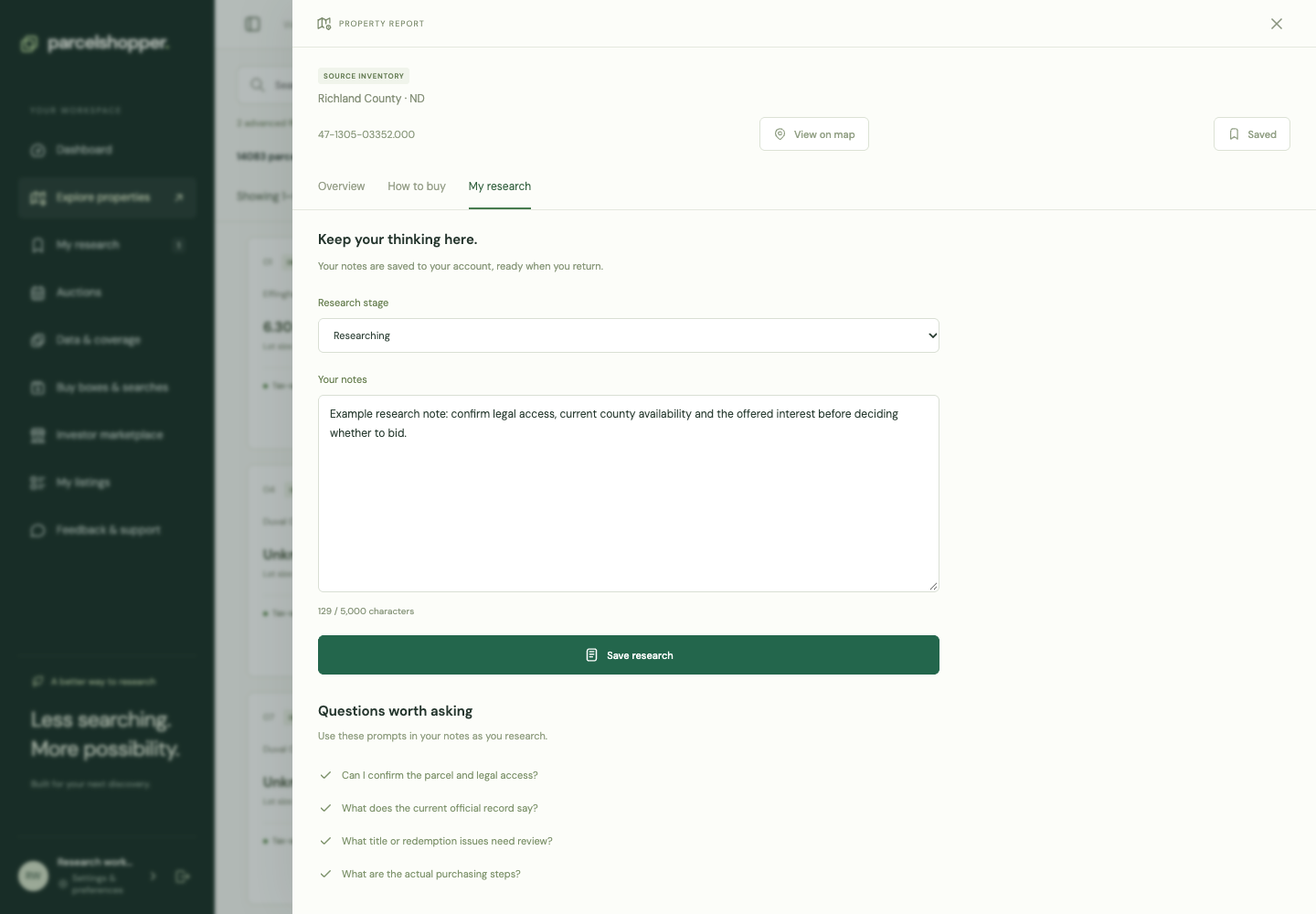
Save a parcel to revisit it. Use a note to record what you found, and a stage to show where you are in the decision.
Demonstration note, November 8, 2026. The displayed parcel is not a purchase recommendation.
Save or remove a parcel
Find a candidate in Explore, then choose Save parcel in its report or use the save control in the results. Open My research for your saved list. Use the Saved control to remove a parcel.
Saving does not reserve it or update the seller's records. Recheck availability when you return.
Add a note
Open the report's My research tab. Record the source, date and next question. For example: "Confirm whether the notice covers the entire parcel; compare the legal description with the recorded instrument."
An observation such as "road visible on aerial image" is different from confirmed legal access. Keep the supporting source with a conclusion. Notes allow up to 5,000 characters. Choose Save research to save the note and stage.
Set the stage
Choose Considering, Researching, Ready to pursue, Passed or Acquired. These describe your own decisions, not the government's listing status.
If you pass, leave the reason so you do not repeat the work later. Use Acquired for a completed acquisition.
Your dashboard links back to the research. Filter by stage to organize the list. To repeat the search that found it, save the criteria separately in Buy boxes & searches.

Discussion